Honda Car Key Cover: How to Check the Right Fit for Your Car Model
To ensure a Honda car key cover fits your key fob perfectly, check three critical details before buying:
- Key Generation & Shape: Identify whether you have a 3-button flip key, a 4-button standard remote, or a modern 5-button smart key fob (engine start/stop).
- Button Layout & Symbols: Match the exact order of buttons (Lock, Unlock, Trunk Release, Panic, Remote Start).
- Emergency Key Slot: Verify whether your key fob has an internal emergency key release latch or an exposed physical key blade.
Never buy a cover based solely on your car’s manufacturing year or model name (e.g., “Honda Civic”), as key fob designs often vary across trim levels (e.g., LX vs. Touring). Always compare your physical key side-by-side with the product illustration.
Why Honda Key Fobs Require Precise Fitting
Honda key fobs house sensitive printed circuit boards (PCBs), transponder chips, and proximity sensors. A poorly fitted cover can lead to several functional issues:
- Button Misalignment: Excess clearance prevents the cover from making direct contact with the internal micro-switches, requiring hard presses.
- Signal Dampening: Overly thick metallic or dense TPU covers can block RF (radio frequency) signals sent to the vehicle’s receiver.
- Proximity Interference: Smart key fobs rely on low-frequency signals to enable passive entry and push-button start. Improper clearance around the internal antenna can disable touch-to-unlock features.
Step-by-Step Guide: Choosing the Correct Key Cover Fit
1. Identify Your Key Fob Type
Honda uses three main key structures across its vehicle lineup:
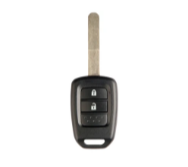
- Integrated Remote Head Key: Common on base trims (e.g., Civic LX, HR-V LX). The blade extends permanently from a plastic head containing remote buttons.
- Folding / Flip Key: The blade retracts into the side of the housing via a push button.
- Smart Key Fob (Smart Entry System): Found on modern mid-to-high trims (Accord, CR-V, Pilot, Civic EX/Touring). Features no exposed blade; contains an internal emergency key.
2. Count the Buttons and Map Their Functions
Key covers are molded with raised or debossed button icons. A mismatch will obscure or misalign control surfaces:
| Honda Fob Configuration | Typical Button Layout | Common Vehicle Models |
| 3-Button Fob | Lock, Unlock, Panic | Base Trim Civic, Fit, HR-V |
| 4-Button Fob | Lock, Unlock, Trunk, Panic | Accord Sedan, Civic Sedan (EX) |
| 5-Button Smart Fob | Lock, Unlock, Remote Start, Trunk, Panic | Accord Touring, CR-V EX-L/Touring, Pilot |
3. Check Key Fob Dimensions Across Generations
Honda modified its smart key shell profile across vehicle generations:
- Generation 9 (2012–2016): Rectangular profile with curved edges and a glossy back panel.
- Generation 10 (2016–2021): Tapered shield-shaped housing with prominent side contours.
- Generation 11 (2022+): Sleek, boxier silhouette with refined chrome side accents and flatter button faces.
An ideal Honda car key cover must match the precise dimensional contours of your generation to fit snugly without sliding or popping open.
Material Comparison: Selecting the Right Key Cover
Different key cover materials offer varying balances of protection, durability, and signal pass-through.
Soft TPU (Thermoplastic Polyurethane)
- Pros: Highly scratch-resistant, available in metallic finishes, tight snug fit.
- Cons: Lower-grade TPU can yellow over time under direct UV exposure.
Silicone
- Pros: Excellent shock absorption, anti-slip surface, affordable.
- Cons: Attracts lint and dust; can stretch out over long-term use.
Genuine / Synthetic Leather
- Pros: Premium executive tactile feel, classic aesthetic.
- Cons: Requires precise stitching; may add slight bulk around key ring attachment loops.
Frequently Asked Questions
How do I know which key cover fits my Honda?
Check your physical key fob against the cover manufacturer’s compatibility diagram. Count the total buttons, check for a flip blade versus a smart key shape, and confirm your car’s model generation.
Do all Honda keys use the same size cover?
No. Honda key fobs vary significantly based on vehicle generation, trim level, and keyless entry technology. A Honda Civic key fob from 2015 uses a different shape than a 2023 Honda Civic key fob.
Will a silicone cover block my Honda key fob signal?
No. High-quality silicone and TPU covers do not block radio frequencies. However, fully enclosed aluminum or heavy metal alloy covers can reduce remote operating range.
Can I use a key cover if my key fob has a remote engine start button?
Yes, but you must select a 5-button cover designed specifically with the top “Engine Hold” icon printed on the surface.
How do I install a TPU key cover on a Honda key fob?
Slide the key fob bottom-first into the flexible front shell, snap the rear panel into place, and secure the key ring strap through the top mounting loop.
Standard FAQs
Why is my key fob cover loose after installation?
A loose fit occurs when a cover designed for a newer or larger key fob generation is used on an older key fob design. Ensure the product listing explicitly matches your exact key style.
Does a key cover protect against water damage?
While a protective cover shields against light rain and splashes, most key covers are open around key ring attachments and do not make key fobs completely submersible.
How do I remove my Honda emergency key with a cover on?
Quality key covers feature a bottom cut-out or quick-release back access panel that lets you push the emergency key release slider without taking off the entire cover.
Will a key cover affect push-button start?
No. Push-button start relies on low-frequency RFID proximity signals, which easily pass through TPU, leather, and silicone materials.
Final Checklist Before Buying Your Honda Key Cover
Before completing your purchase of a Honda car key cover, run through this final checklist:
- Count Your Buttons: Match the total button count (3, 4, or 5) exactly.
- Examine the Backing: Check whether your fob features a rear Honda badge cutout or a full solid panel.
- Verify the Top Loop: Ensure the top opening accommodates your preferred key ring, lanyard, or carabiner attachment.
- Inspect Key Blade Location: If you have a flip key, verify that the side flip mechanism remains unobstructed by the outer bezel.